Overview & Real-World Use
If you've ever tried to run email marketing out of WordPress without drowning in third-party tools, you know the pain. Most solutions either force you off-platform or turn your site into a Frankenstein of plugins and API keys. FluentCRM v3.2.5 takes the opposite approach — it lives right inside your WordPress install and gives you full control over the entire subscriber journey, from lead capture to automated follow-up.
I've had this plugin running on a few client sites for the past several months — mostly for SaaS companies and online course creators who needed to segment audiences and fire off behavior-triggered sequences without paying monthly SaaS fees. It handles that workload cleanly, and the fact that all contact data stays on your own server is a genuine advantage for privacy-conscious businesses.
This isn't a theme. It's a full marketing automation system, and it's aimed squarely at WordPress site owners who want CRM-level functionality without the CRM-level pricing.
Design & Page Builder Workflow
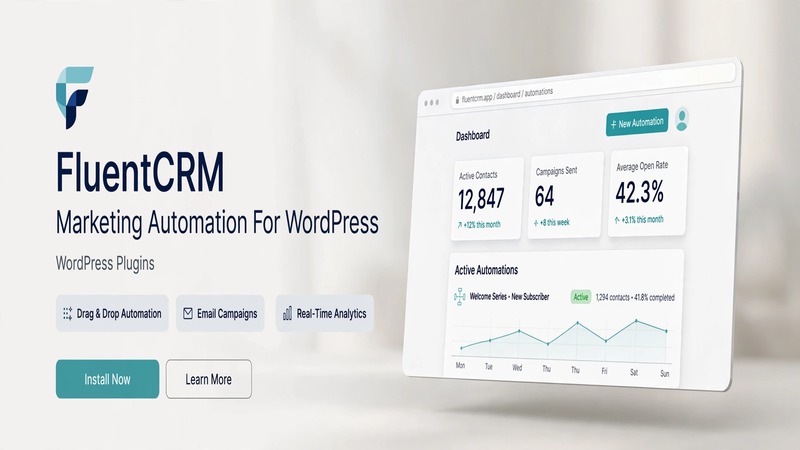
FluentCRM doesn't come with pre-built page templates because it isn't a theming product — it's a functional plugin. That said, its onboarding flows, dashboard layout, and campaign builder are all designed with a modern, uncluttered aesthetic that doesn't fight against your existing site design. The admin interface uses a clean sidebar navigation pattern, and the visual workflow editor for automation sequences is genuinely one of the more intuitive ones I've used in this space.
Builder integration is where this plugin earns its keep. It works natively with both the Gutenberg block editor and Elementor, so you can drop in opt-in forms, embedded sign-up widgets, and campaign landing pages directly into your existing page layouts. The form builder itself is drag-and-drop, and the templates it offers for common use cases — lead magnets, webinar registration, product upsells — are clean and conversion-focused out of the box.
There's also a solid library of pre-styled form templates if you'd rather not start from scratch. I appreciate that the styling options don't require custom CSS for most adjustments — font sizes, colors, button shapes, and spacing all adjust through the built-in controls.
Practical Functionality
The core value of FluentCRM comes down to four things: contact management, email campaigns, automation sequences, and reporting. Here's how each one actually feels in practice.
Contact Management & Segmentation
FluentCRM treats contacts like real relationships. Every subscriber gets a detailed profile — registration date, tags, list memberships, purchase history (if you're running WooCommerce), and interaction logs. Tagging is flexible and powerful. You can assign tags manually, through form submissions, or automatically via workflow rules. The segmentation builder lets you filter contacts by any combination of fields, tags, or behaviors, which means you can build highly specific audiences without leaving the dashboard.
Email Campaigns
The campaign builder supports both single-send broadcasts and ongoing drip sequences. The email composer is built directly into WordPress — no pop-out builders or external editors. You get a full WYSIWYG editor, template library, and support for dynamic tags so each recipient sees their name, relevant links, and personalized content. Transactional email support is there too, which matters if you're sending order confirmations or password resets.
Automation Workflows
This is the part that impressed me most. The visual automation builder uses a node-based interface where you chain together triggers, conditions, actions, and delays. A typical flow might look like: new contact from Form A → wait 2 days → send welcome email → check if they opened it → if yes, tag as engaged → if no, send follow-up. The logic is clear, and the debugger tools make it relatively straightforward to test and troubleshoot sequences before they go live.
WooCommerce Integration
If you're running an online store, the WooCommerce integration is tight. Contact records pull in purchase data automatically — order history, total spend, product categories — and you can trigger campaigns based on purchasing behavior. Abandoned cart follow-ups, post-purchase upsell sequences, and customer re-engagement flows are all setup-friendly through the workflow editor.
Reporting & Analytics
Campaign reports show open rates, click rates, unsubscribes, and bounce breakdowns at a glance. The analytics don't stop at individual campaigns either — you get aggregate views of list growth, engagement trends, and revenue attribution. For agencies managing multiple clients, the ability to switch between site dashboards without losing context is a nice touch.
Multi-Language & Extensibility
The plugin is translation-ready and works with WPML and Polylang, which matters if you're building sites for non-English markets. There's also a robust API and action hook system for developers who want to extend behavior or integrate with external tools.
Technical Specifications
| Specification | Details |
|---|---|
| PHP Version | 7.4+ (8.0+ recommended) |
| WordPress Compatibility | 5.7+ (tested up to latest) |
| License | Commercial / GPL v2+ |
| Bundled Plugins | None required; third-party integrations available |
| Third-Party Dependencies | Optional: WooCommerce, WPML, FluentSMTP |
| Documentation | Comprehensive in-app help + online knowledge base |
| Updates | Automatic through WordPress admin |
| Support | Community forum + paid support tier |
Final Takeaway
FluentCRM v3.2.5 is one of the more complete marketing automation solutions you'll find natively inside WordPress. It's not trying to be a replacement for Mailchimp or ConvertKit — it's aiming higher, offering similar power without the monthly per-subscriber pricing. For WordPress developers and agency owners who manage multiple client sites, the ability to keep everything on-domain, customize workflows with hooks, and hand off clean dashboards to clients is genuinely compelling.
It's worth noting this plugin has a learning curve. If you've never built automation sequences before, expect a couple of evenings to get comfortable with the workflow editor. But once it clicks, it's hard to go back to disjointed third-party tools.
Best suited for: WordPress agencies, WooCommerce store owners, course creators, and anyone tired of paying platform fees for email marketing that should live inside their own site.
Skip it if: You need a simple newsletter tool and don't care about automation, segmentation, or keeping data on your own server.