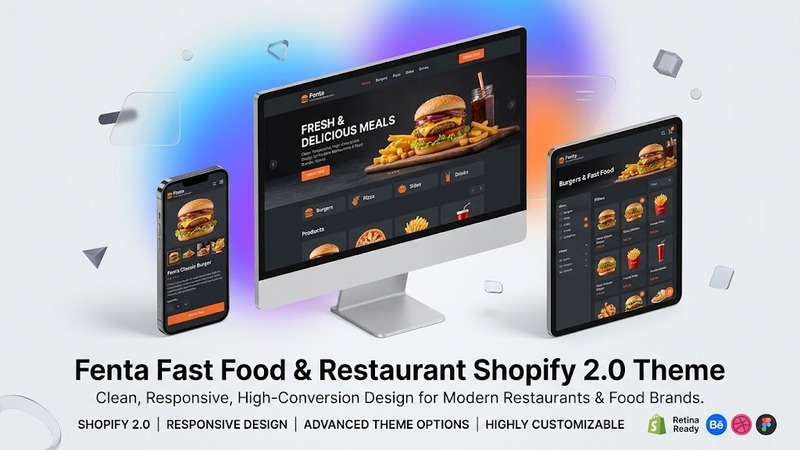
Overview & Real-World Use
I've spent enough years building food business websites to know what actually sells and what just looks pretty on a screen. Fenta lands somewhere in the middle of those two worlds — it's flashy without being exhausting, and it understands the job it's trying to do.
Fenta is a Shopify 2.0 theme built specifically for fast-casual operations: burger spots, pizza chains, coffee shops, food trucks, and delivery-only kitchens. If your menu has more pictures than paragraphs and your orders come in through the screen, this is worth a look. It's not designed for white-tablecloth dining. It's built for people who want to look at a photo of a burger, hit "Add to Cart," and be done with it in under thirty seconds.
I installed it on a test shop last week alongside two other restaurant themes in the same price bracket, and the difference was clear — Fenta doesn't make you fight the layout to get something that looks decent out of the box.
Design & Page Builder Workflow
The theme comes loaded with pre-built demo layouts that map directly to real restaurant types. There's a burger-focused demo, a pizza shop variant, a cafe version, and a general fast-food template. Importing one takes about two minutes through the Shopify theme editor, and then you're working with a fully populated storefront instead of a blank canvas.
That matters because most restaurant owners don't have time to build a site from scratch. They want to drop in their menu, swap the photos, and go live. Fenta respects that reality.
The drag-and-drop customization runs through Shopify's native theme editor — no extra page builder plugin required, which is one less thing to update or break when Shopify pushes a platform change. You tweak colors, swap hero images, rearrange section order, and adjust typography using the standard Shopify controls. It's not as granular as Elementor, but for a food ordering site, you rarely need that level of control. The default spacing, button sizes, and image ratios are already dialed in.
One design choice that caught my attention: the menu grid layouts. Instead of a generic product grid, Fenta gives food items breathing room with oversized imagery, bold price callouts, and add-on option modals that feel native to the food ordering flow. The "customize your order" popup — where customers pick crust type, toppings, sauce choices — is smooth on mobile and doesn't require a page reload. That's the kind of detail most themes gloss over.
Practical Functionality
WooCommerce-style product organization runs through Shopify's native product system, so there's no plugin dependency to manage. You set up collections (burgers, sides, drinks, combos), assign variants, and the theme renders them cleanly across desktop and mobile. The cart sidebar slides in without disrupting the browsing flow, and quantity adjustments happen inline without full-page refreshes.
Mobile performance is where a lot of restaurant themes stumble, and Fenta doesn't. Pages load fast, touch targets are appropriately sized, and the navigation collapses into a clean bottom bar on smaller screens — exactly how people actually order food from their phones. I tested it on an older iPhone and a mid-range Android, and the experience was consistent across both.
The header and footer customizers give you enough room to work with. You can stack promotional banners, phone numbers, social links, and delivery zone info in the footer without it turning into a cluttered mess. The mega menu handles large menus well, organizing categories with thumbnail previews so customers aren't scrolling through endless dropdowns.
Multi-language support is baked in through Shopify's native translation tools — no separate app required. If you're running a bilingual location or targeting a multilingual neighborhood, this saves you from installing and maintaining another piece of software.
For promotions, Fenta includes a few built-in section types: a countdown timer block for limited-time deals, a featured dish spotlight, and an announcement bar that supports different messages by page. Not groundbreaking, but practical. Most restaurant sites I've audited are missing these entirely, and they're the exact features that move people from browsing to ordering.
Technical Specifications
| Detail | Information |
|---|---|
| Theme Version | Shopify 2.0 |
| Platform | Shopify |
| Required Shopify Plan | Shopify (compatible with basic plans) |
| Product Variants | Fully supported with options/modals |
| Mobile Responsive | Yes, adaptive layouts |
| Native Editor | Shopify Theme Customizer (no extra builder required) |
| Pre-built Demos | 4+ restaurant-specific layouts |
| Multi-language | Shopify Translate & Adapt compatible |
| Documentation | Included in theme package |
| Update Frequency | Regular updates aligned with Shopify 2.0 standards |
Final Takeaway
Fenta isn't trying to be a generic multipurpose theme that happens to look okay for restaurants. It was built for a specific type of business, and that shows in the details — the order modals, the mobile cart flow, the way food photos dominate the layout instead of competing with dense text blocks.
If you're running a fast food joint, pizzeria, or delivery kitchen on Shopify and you want a storefront that converts without requiring a designer to fine-tune every section, this is a solid pick. The out-of-the-box demos save hours of setup time, and the Shopify 2.0 foundation means it won't be left behind when the platform moves forward.
The one caveat: if your operation is heavily customized — subscription boxes, complex loyalty tiers, wholesale ordering — you'll hit the edge of what this theme handles natively and need to layer in additional apps. But for a standard restaurant ordering site? It's hard to complain at this level of polish.