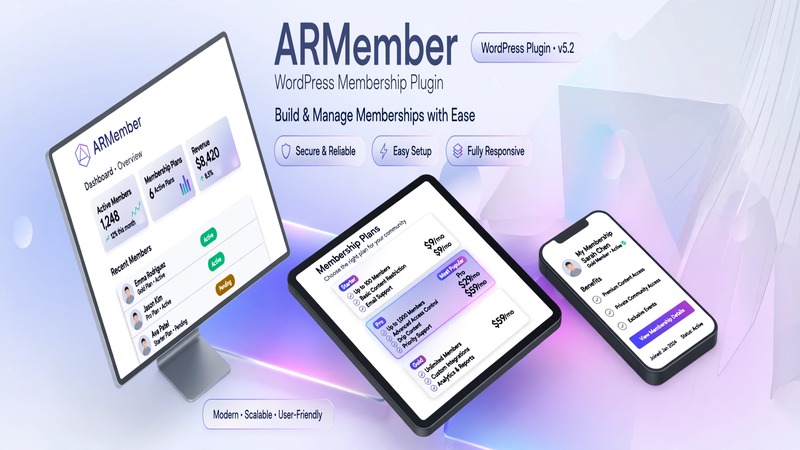
Agency Executive Summary & Business Fit
ARMember v7.9 lands squarely in the "install it once, customize it twice" category of WordPress membership plugins. It's designed for agencies and freelance developers who need to spin up membership sites fast without wrestling with custom code or juggling a dozen separate plugins for user registration, profile management, and subscription billing.
The ideal client profile here is straightforward: small to mid-size businesses selling digital access—coaches, course creators, SaaS-style services, professional associations, and local service shops that want tiered access control (free, premium, VIP). It also works well for corporate intranet-adjacent portals where you need gated content behind a login wall.
What makes this one worth noting is the all-in-one positioning. You're not layering a membership plugin on top of a form builder, then another for profiles, then a third for payment gateways. ARMember bundles registration, user profiles, content restriction, and subscription management under a single admin panel. For production builds, that means fewer conflicts, cleaner audits, and a faster handoff.
Estimated production turnaround for a standard membership site with three tiers, payment integration, and content gating sits at 2–4 days depending on complexity. Bare-bones setup—registration plus a single paid tier—can go live in under a day.
Visual Architecture & Conversion-Focused Layouts
ARMember ships with template-driven layouts that lean heavily on clean, conversion-oriented design principles. The default member area pages—registration, login, membership tiers, and user dashboards—are structured with clear visual hierarchy: prominent CTAs above the fold, pricing tables that scale across tiers, and profile sections that keep navigation intuitive.
The typography balance follows modern WordPress standards—readable body sizes, sufficient contrast ratios, and spacing that doesn't feel cramped on mobile. This matters because membership sites live or die by friction. If a visitor can't find the signup button or can't parse what each tier offers in three seconds, you've already lost them.
Mobile-first responsive handling is baked into the layout system. The pricing tables collapse gracefully, form fields stack cleanly on narrow screens, and navigation menus don't overlap content. For agencies that don't want to spend hours tweaking breakpoints, this is a solid starting point.
Call-to-action arrangements prioritize the primary conversion path: sign up → choose a tier → complete payment → access content. Secondary actions like "Forgot Password" and "Login" are visible but deliberately less prominent, which keeps the funnel focused.
Practical Customization & Client Handoff
One of the stronger selling points for agency use is how ARMember handles customization without requiring development work. The plugin integrates with both the native Gutenberg editor and popular page builders, so your team can pick the workflow that fits the project.
Gutenberg users can rely on block-based templates for registration forms, tier listings, and member dashboards. These render fast and don't carry the overhead of third-party builder dependencies.
Elementor users get template compatibility that lets you redesign membership pages visually while preserving the plugin's dynamic fields. This is where you'd spend most of your styling time—adjusting colors, spacing, and layout to match the client's brand guidelines.
Global theme styling through WordPress's customizer means you can push color shifts, font changes, and spacing adjustments that cascade across all ARMember pages. You're not editing each template individually. That saves hours on client revisions.
White-labeling is available, which matters when you're selling to clients who want the admin experience to look like their own product. You can remove ARMember branding from the frontend member area and customize the login redirect behavior to match the site's flow.
For client handoff, the dashboard is deliberately simple. The membership admin panel surfaces the most common tasks—creating tiers, managing users, viewing registrations—without burying features under nested menus. A quick 30-minute walkthrough during onboarding usually covers everything the client needs to run the site independently.
Core Feature Breakdown & E-Commerce Readiness
Membership & Subscription Management
The core engine handles one-time payments and recurring subscriptions. You can set up free, paid, and trial tiers with overlapping access rules. Content restriction works at the post, page, custom post type, and even category level, giving you granular control without writing conditional logic.
WooCommerce Integration
If your client already runs a WooCommerce store, ARMember's integration layer connects membership tiers directly to products. A product becomes a subscription path. This is the most common production setup—sell a physical or digital product, and that purchase automatically grants access to the corresponding membership level. It eliminates the need for custom hooks or workaround plugins.
Forms & Registration
Built-in registration forms support email confirmation, social login, and custom fields. You can enforce approval workflows for manual vetting (useful for B2B clients or association-style memberships) or automate acceptance. Social login reduces friction at signup, which directly improves conversion rates on traffic-driven campaigns.
User Profiles
Profile pages are pre-built and customizable. Users can edit their own information, view order history, and manage their subscription status from within the dashboard. For agencies, this means less pressure to build profile functionality from scratch.
SEO & Performance
ARMember structures membership-related content with proper schema markup, so search engines understand which pages are gated versus public. This doesn't change how you index or promote the site, but it does keep the plugin from introducing technical SEO debt.
Performance-wise, the plugin is reasonably lightweight. It plays well with caching solutions like WP Rocket and W3 Total Cache. The main thing to watch is the number of active membership tiers and restrictions—each additional rule adds a slight query overhead. For most sites with under 50 tiers, you won't notice a slowdown. On larger installations, pair it with object caching and review your restriction rules periodically.
Production Environment & Requirements Checklist
| Requirement | Minimum Specification |
|---|---|
| WordPress Version | 5.0 or higher |
| PHP Version | 7.4 or higher (8.1+ recommended) |
| MySQL Version | 5.6 or higher |
| Memory Limit | 128MB minimum (256MB recommended) |
| Required Plugins | None (standalone) |
| Optional Dependencies | WooCommerce (for e-commerce integration) |
| Payment Gateways Supported | Stripe, PayPal, 2Checkout |
| Page Builder Compatibility | Elementor, Gutenberg |
| Update Protocol | Via WordPress admin → Plugins → Updates (auto-updates supported) |
| Backup Recommendation | Full site backup before major version upgrade |
Agency Verdict & Value Assessment
Deploy ARMember v7.9 when your project demands a reliable membership system without the overhead of custom development. It's strongest for clients who need functional tiers, payment processing, and content restriction out of the box and who value a manageable admin interface.
Maximum ROI comes from projects where membership logic is central to the business model—subscription boxes, online courses, professional networks, and gated resource libraries. For these, the plugin pays for itself in development time saved.
Skip it if your client needs deeply custom access rules (multi-layered conditional logic, drip scheduling with complex sequencing, or enterprise-grade role management). In those cases, a combination of custom post types with a membership framework like MemberPress or a bespoke solution will serve better.
For the average agency build—three to five membership tiers, WooCommerce-powered payments, clean frontend templates, and a client who needs to manage things without calling you every week—ARMember v7.9 is a pragmatic, production-ready choice.